 Vista
Hindi typing becomes easier when you practise with the exact keyboard layout required by your software or examination. Kruti Dev 010, Remington Gail and InScript are often searched together, but they are not interchangeable names for one keyboard. Kruti Dev 010 is a legacy font; Remington and InScript describe input arrangements. Unicode is a character encoding standard, while Mangal is a font that can display Unicode Devanagari. Before learning a key combination, determine which layout and encoding you actually need.
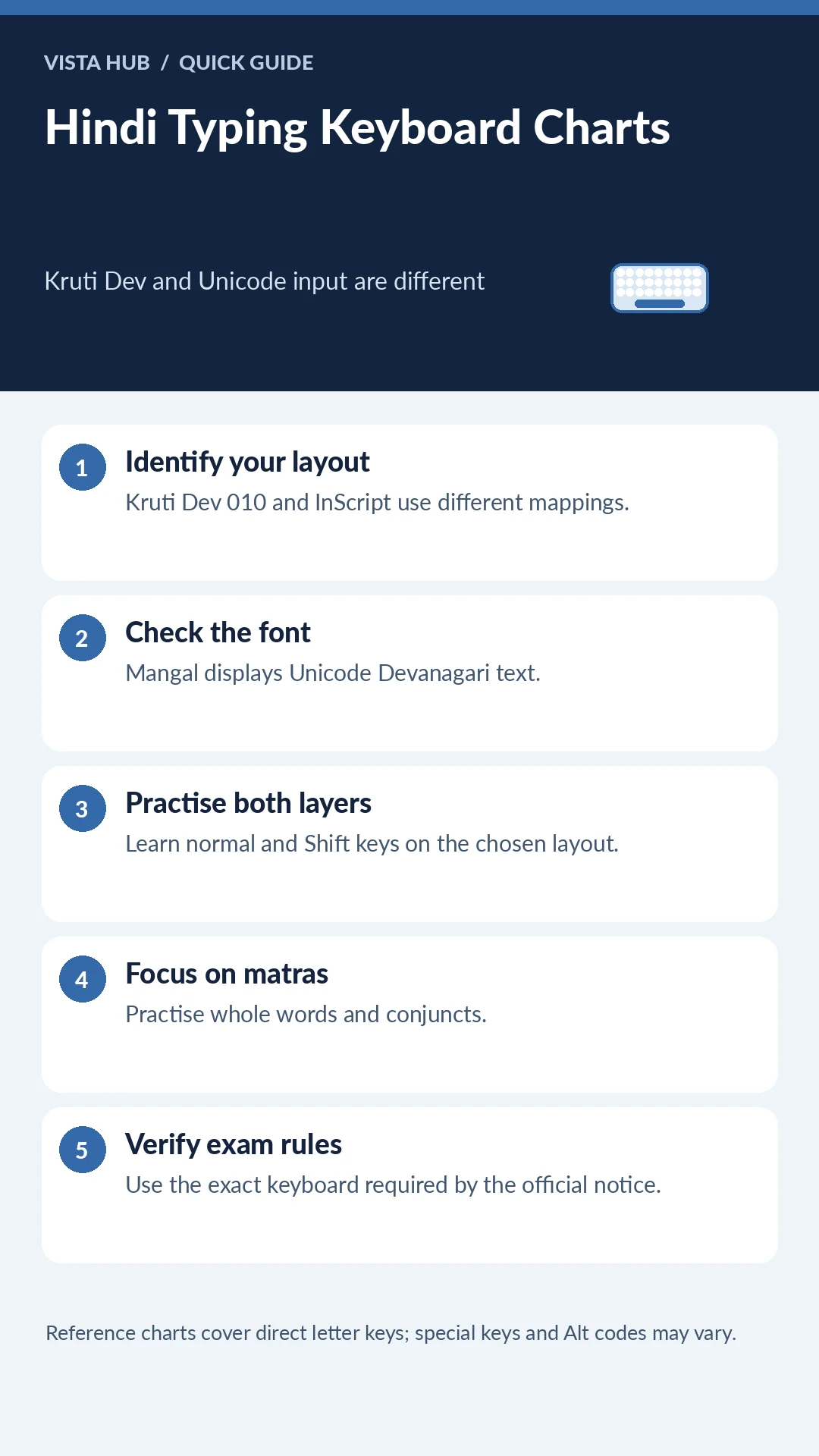
Kruti Dev 010, Remington Gail and Mangal InScript: the difference
| Term | What it describes | What to verify |
|---|---|---|
| Kruti Dev 010 | Legacy Hindi font and associated character mapping | Exact font and source text encoding |
| Remington | Typewriter-style keyboard arrangement | Specific keyboard implementation |
| Remington Gail | A named Remington-style input layout | Required driver and version |
| InScript | Indian-script keyboard layout | Language and installed layout version |
| Mangal | Unicode Devanagari display font | Correct Unicode text and rendering support |
The font selected in a word processor does not determine the keyboard layout by itself. Two people can produce identical Unicode Hindi text using different keyboards. Conversely, text typed for a legacy font may display Latin-looking characters when opened without that font.
Which Hindi typing chart should you use?
Begin with the current official examination notice if you are practising for a typing test. Check the accepted input method, keyboard layout, language, software, font if prescribed, test duration and assessment criteria. Some examinations use Unicode-based input, while older office documents may still depend on legacy fonts. Do not assume the same font or layout is accepted in every recruitment.
For general Hindi writing in modern applications, choose a Unicode-capable keyboard that you can use comfortably. InScript is one option. C-DAC maintains InScript keyboard layout information and multilingual typing resources. A phonetic input method may be useful for ordinary writing, but an exam may prescribe another input layout.
How to read a keyboard layout chart
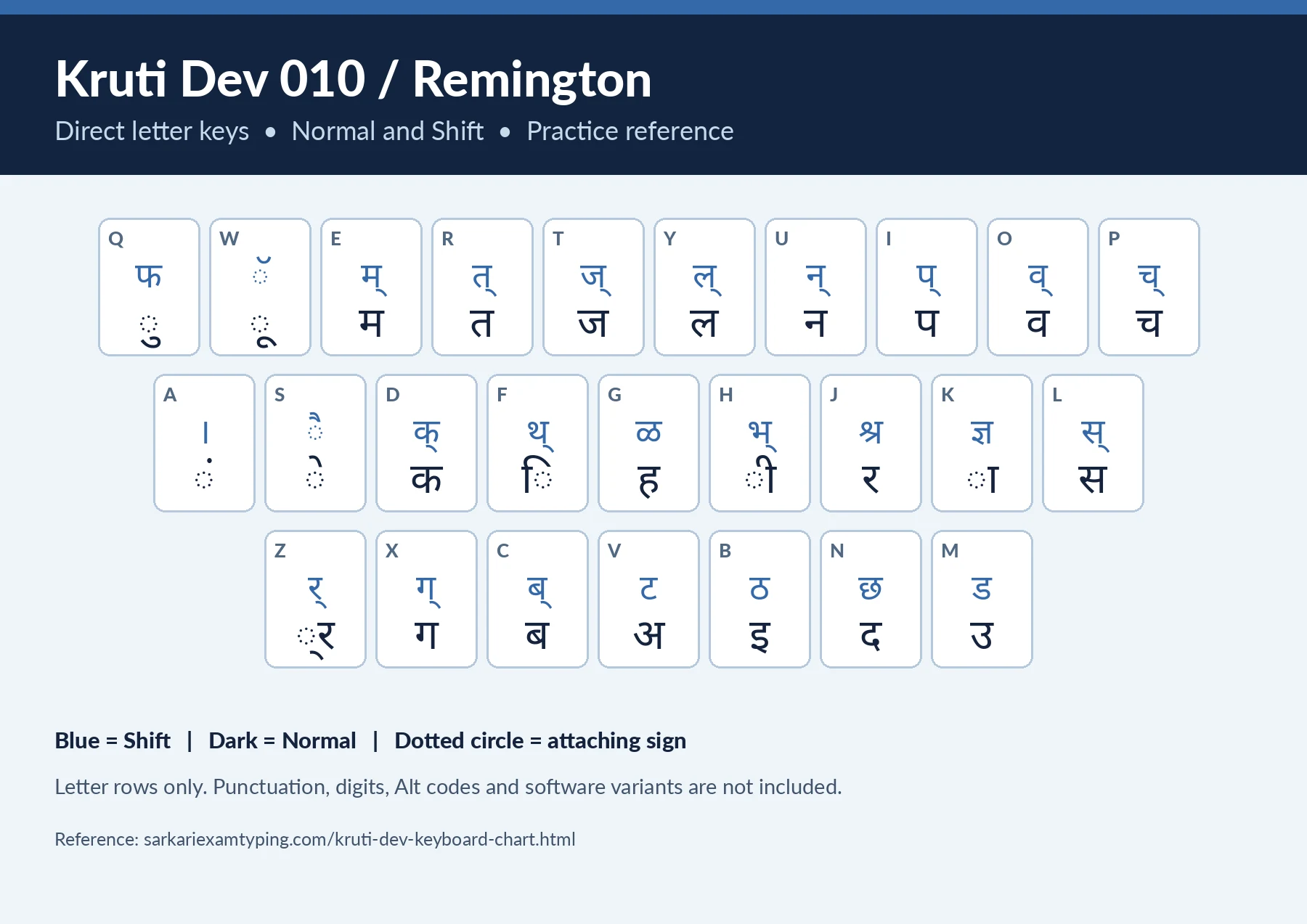
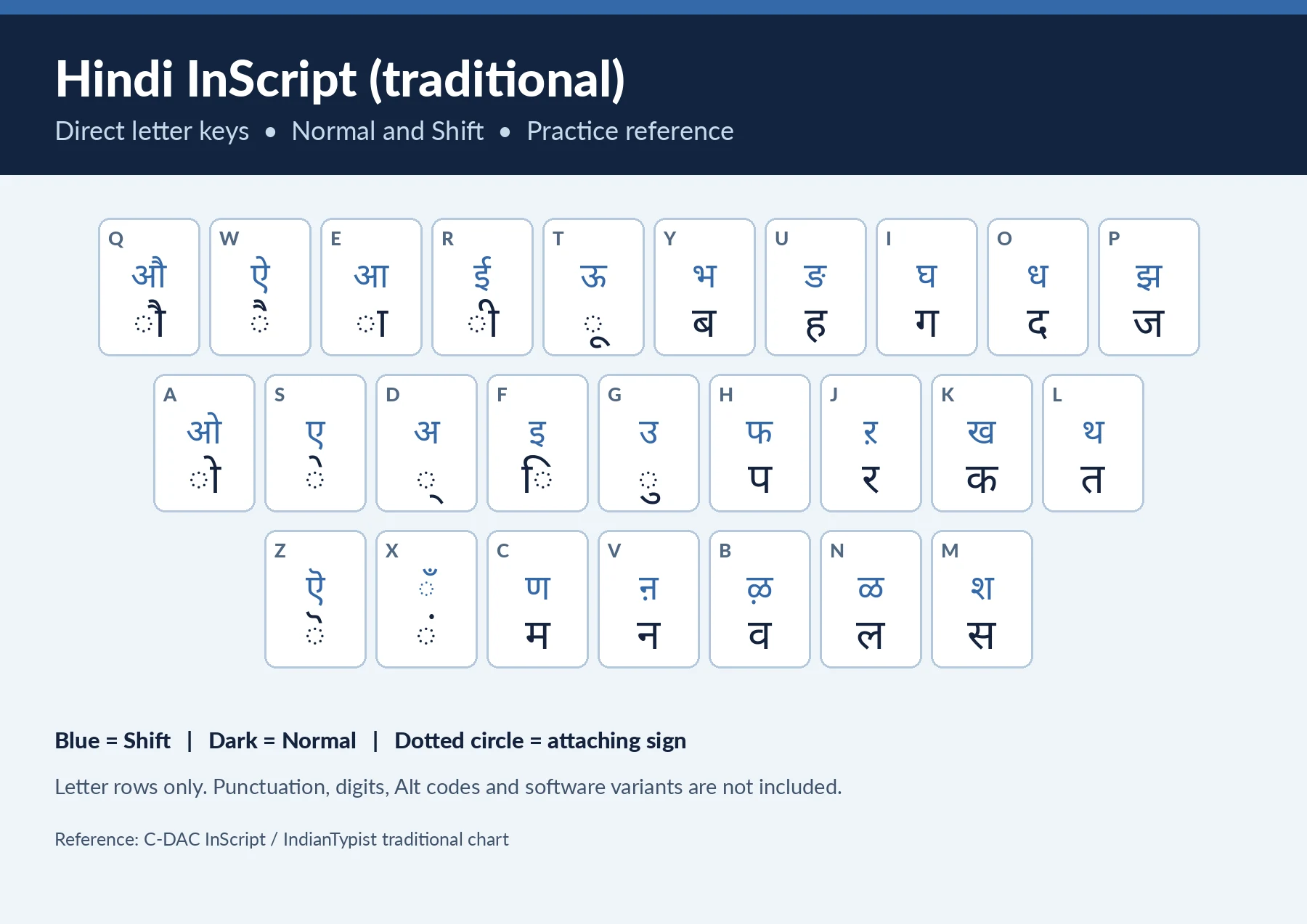
A useful chart identifies the physical keys, their unshifted outputs, shifted outputs and any additional modifier layer supported by the selected layout. Learn one row at a time. Do not assume that a symbol printed on a legacy chart generates the same Unicode character as a similar-looking symbol on an InScript chart.
Practise the home row, then the upper and lower rows. Look at the key positions rather than memorising random sequences from several layouts. Keep the chart for the exact implementation visible during practice, then gradually reduce your dependence on it. A chart should state its layout name and version so that learners can reproduce the results.
Matras, half letters and conjunct practice
Hindi words involve independent vowels, consonants, dependent vowel signs, nasal signs and conjuncts. In Unicode, a halant is used in consonant combinations; the rendering system handles the visible placement of dependent signs and shaping. For example, कि contains क followed by the dependent vowel sign ि in logical text order even though the sign appears before the consonant in the rendered word. The key sequence depends on the chosen input layout.
| Practice type | Example text |
|---|---|
| Independent vowels | अ आ इ ई उ ऊ ए ऐ ओ औ |
| Vowel signs | का कि की कु कू के कै को कौ |
| Conjuncts | क्ष त्र ज्ञ श्र |
| Reph and consonant combinations | कर्म धर्म प्रकार प्रश्न |
| Nasal and other signs | अंग हिंदी चाँद दुःख |
These examples are target text, not claims about particular key sequences. Consult the chart corresponding to your keyboard. Unicode’s Indic scripts FAQ explains why glyph shaping and character encoding are separate concepts.
Hindi typing Alt codes: important limitations
Some legacy workflows use numeric Alt-key sequences or font-specific combinations for additional symbols. These shortcuts may depend on the operating system, application, code page, keyboard and font. A list collected from another environment may produce a different character on your computer. Verify each combination in the exact software before including it in a practice chart. Unicode characters can also be inserted through an application’s supported character picker or input method.
Seven-day practice routine
- Day 1: learn unshifted letters in one row and practise short words.
- Day 2: add the remaining rows and simple vowels.
- Day 3: practise matras using the same consonant with several vowels.
- Day 4: practise half letters, conjuncts and common words.
- Day 5: type sentences with punctuation and numbers.
- Day 6: copy a paragraph accurately and review every error.
- Day 7: repeat the exercise with a timer under the required test conditions.
Accuracy matters more than racing through an unfamiliar layout. Record repeated errors and practise those combinations. Do not switch layouts halfway through a timed exercise unless the test explicitly permits it.
Converting old Kruti Dev text to Unicode
For documents already encoded in Kruti Dev, use our Kruti Dev to Unicode converter. For the reverse workflow, see Unicode to Kruti Dev. Preserve the original file and verify the converted output carefully, especially names, dates, conjuncts and mixed English text. Conversion is not the same as changing the appearance of a font.
Frequently asked questions
Is Mangal a keyboard?
No. Mangal is a font; InScript and other input methods are keyboard layouts.
Is Remington Gail identical to Kruti Dev?
No. A layout and legacy font mapping are separate. Check your software’s exact implementation.
Can I practise Hindi typing on a phone?
Yes for general text practice, but use the physical keyboard and prescribed layout for a computer-based typing test.
Will every Alt code work on every computer?
No. These sequences may depend on the software environment.
Where can I find official InScript information?
Use the C-DAC resources linked above and compare the installed keyboard version.
Conclusion
Choose the correct layout first, practise one consistent set of key positions, and keep legacy encoding separate from Unicode text. Check the exact examination or document requirement before selecting a chart.
Kruti Dev 010 vs InScript: selected key comparison
MP CPCT specifies Unicode Remington (GAIL) or InScript. Do not treat a Kruti Dev 010 legacy chart as an exact substitute for GAIL.
| Physical key | Kruti Dev 010 | Traditional InScript |
|---|---|---|
| d | क | ् |
| k | ा | क |
| f | ि | ि |
| j | र | र |
| e | म | ा |
| s | े | े |
| g | ह | ु |
| fd / kf | कि (fd) | कि (kf) |
This is a selected unshifted-key comparison, not a complete Shift/Alt chart. The downloadable PDF and images still require separate key-by-key verification.
MP CPCT typing instructions · DDA Remington GAIL keyboard reference · Microsoft Hindi Traditional keyboard · Kruti Dev practice key reference
Keyboard layout references
Check the exact font version and key mappings before using these practice charts. They are not a complete reference for all legacy encodings or Alt codes.























Share Your Opinion
Comments are closed on this post.