 Vista
Updated: 24 November 2026
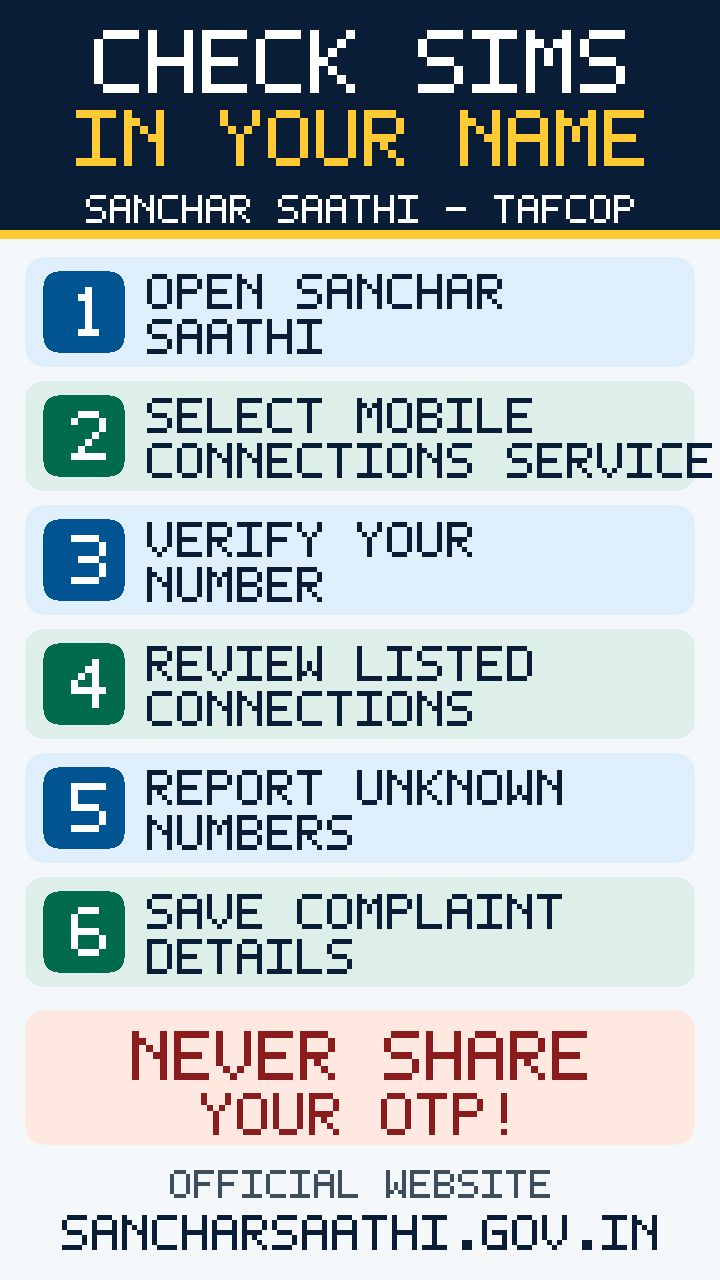
To check how many SIM cards are registered in your name in India, visit the Department of Telecommunications’ official Sanchar Saathi website and select Know Mobile Connections in Your Name, also known as TAFCOP. Verify your active mobile number using the official one-time password (OTP) process. Review the connections displayed and report a number you never obtained under Not My Number. If you recognise a connection but no longer need it, select Not Required instead.
You do not need to pay an agent or send your complete Aadhaar number to a private website to use this facility. If you suspect identity theft, preserve your report details and contact the telecom operator. Additional complaints to UIDAI, the cybercrime portal or the police may be necessary depending on the circumstances.
What is TAFCOP and how does Sanchar Saathi help?
Sanchar Saathi is a citizen-facing telecom safety initiative of India’s Department of Telecommunications (DoT). Its Telecom Analytics for Fraud Management and Consumer Protection module helps subscribers review mobile connections issued in their name and identify connections they did not obtain or no longer require. The list can include connections from different service providers, not just the operator supplying the number used to sign in.
This is a personal connection verification service, not a public tool for looking up the owner, address or identity documents associated with somebody else’s phone number. It also does not give you access to call records, messages or the location of an unfamiliar SIM.
Other Sanchar Saathi features serve different purposes. CEIR helps people block the IMEI of a lost or stolen handset, while Chakshu facilitates reporting suspected fraudulent communications. Select the mobile connections service when your concern is a SIM issued in your name without permission. Reporting an unwanted connection is different from blocking the physical device on which a SIM is used.
How to check mobile connections registered in your name
- Type sancharsaathi.gov.in into your browser rather than opening an unsolicited message link.
- Under the citizen services, select Know Mobile Connections in Your Name to access TAFCOP.
- Enter an active mobile number belonging to you. Complete the displayed security check if requested.
- Request the OTP and enter it yourself on the official website.
- Review the displayed connections. Compare the visible numbers with your current and previous mobile subscriptions.
- Choose the appropriate reporting category for any unfamiliar or unnecessary connection and submit the report. Retain any acknowledgement, reference number or confirmation.
The official Sanchar Saathi mobile app also offers the connection-checking service. Obtain the app through the links on the government website. Avoid unofficial APK files or paid services promising to reveal every SIM linked to an Aadhaar number without verification.
If the OTP does not arrive, confirm that you entered the correct number and that the SIM can receive SMS messages. Retry through the official service or seek assistance from your telecom operator if the problem persists. Never ask another person to disclose an OTP so that you can view their connection records. A legitimate verification code should be entered only by the person authorising the request.
Not My Number versus Not Required: which option should you choose?
| Situation | Appropriate action |
|---|---|
| You never obtained the connection | Report as Not My Number |
| You obtained it but no longer need it | Report as Not Required |
| It is your active or necessary connection | Leave it unreported |
For example, suppose the list contains your current phone number, an old secondary number and an unfamiliar connection. The old number may be unnecessary, while the unfamiliar connection may require investigation. Check whether it belongs to a subscription you previously authorised for a family member or another device. Do not report a genuine connection merely because you do not immediately recognise its visible digits.
Before requesting closure of an old number, check whether it is still associated with banking, UPI, email recovery, government services or other essential accounts. Update those services through their official procedures. If a family member uses a SIM you originally obtained, ask the operator about permitted ownership transfer or a new connection rather than assuming you can change registration details informally.
What happens after reporting an unknown SIM?
A submitted report does not necessarily result in immediate disconnection. The telecom operator may investigate the subscriber records and conduct re-verification in accordance with DoT requirements. This process allows the provider to examine whether the connection was legitimately issued and reduces the risk of disconnecting genuine subscribers following an erroneous report.
Keep the reference number and check the available request status. If the connection remains listed or you suspect criminal misuse, submit a separate written complaint to the operator through its official complaint channel or store. Ask the provider to investigate the registration, preserve relevant customer verification records and communicate the outcome. If necessary, follow the operator’s escalation procedure or the applicable DoT grievance route.
Sample operator complaint: An unfamiliar mobile connection appears to be registered in my name. The available number details are ______, my TAFCOP reference is ______, and I reported it on ______. I did not obtain this connection. Please investigate the subscriber verification records, preserve relevant evidence and take appropriate action under the applicable rules. Kindly provide a written complaint reference and outcome. Name and contact details: ______.
Keep copies of all submissions and responses. Provide identity documents only through verified channels when required. Do not publish unmasked numbers, identity cards or personal information in public social media posts.
Does an unfamiliar SIM mean your Aadhaar has been misused?
Not necessarily. An unexpected entry merits investigation, but TAFCOP alone does not establish which identity document was used or how the connection was issued. Telecom registration may involve other accepted documents and historical customer records. The mobile number associated with your Aadhaar record is also different from the list of telecom subscriptions registered in your name.
If you suspect Aadhaar misuse, use myAadhaar or the official UIDAI services to review your authentication history. UIDAI describes this facility as providing up to 50 authentication records from the preceding six months. The history relates to Aadhaar authentication transactions, not every SIM registration or offline identity verification. An absence of suspicious entries does not conclusively rule out misuse. Save any unfamiliar authentication details and contact UIDAI on 1947 or through its official grievance service.
UIDAI also provides biometric locking to prevent Aadhaar authentication using fingerprint, iris or face modalities while the lock is active. Unlock it yourself through the official service when needed. Biometric locking does not cancel an existing SIM or prevent every type of identity theft; telecom reporting remains necessary.
How to report identity theft or financial fraud involving a fake SIM
If an unknown connection appears to have been used for impersonation, threats, fraudulent accounts or other offences, preserve your evidence and report the incident through the National Cyber Crime Reporting Portal or the appropriate police station. If money has been stolen through financial cyber fraud, notify your bank and call 1930 immediately. A TAFCOP report is not itself a police FIR or a financial fraud complaint.
Section 66C of the Information Technology Act, 2000 addresses fraudulent or dishonest use of another person’s electronic signature, password or other unique identification feature. Section 66D concerns cheating by personation through a communication device or computer resource. Whether these or other legal provisions apply depends on the evidence and investigation. A connection appearing in your name does not automatically make you guilty of somebody else’s conduct. Respond to any genuine police notice and obtain legal advice if needed.
Frequently asked questions about fake SIM cards in India
Can I check all SIM cards using only my Aadhaar number?
The normal TAFCOP web process uses verification of an active mobile number. Do not enter your full Aadhaar number on an unofficial SIM-checking website.
Is the Sanchar Saathi SIM checking service free?
There is no need to pay an agent to access the official connection-checking facility.
How many SIM connections can one person have?
DoT’s general individual subscriber framework specifies a maximum of nine connections across operators, with a special limit of six in Jammu and Kashmir, Assam and North-East licensed service areas. Special categories may follow separate requirements.
What if I accidentally report my own number?
Contact the operator promptly with the report reference and follow its official re-verification instructions.
Does locking Aadhaar biometrics close an unauthorised SIM?
No. Biometric locking and telecom disconnection are separate processes.
Conclusion: Check your registered connections through Sanchar Saathi, report unfamiliar numbers accurately and retain your complaint details. Use UIDAI, telecom and police reporting channels separately when their respective issues arise.
Official sources: DoT/PIB Sanchar Saathi update; TAFCOP reporting guidance; UIDAI authentication FAQ; Information Technology Act. General information for India, not individual legal advice.




















Share Your Opinion
Comments are closed on this post.