 Vista
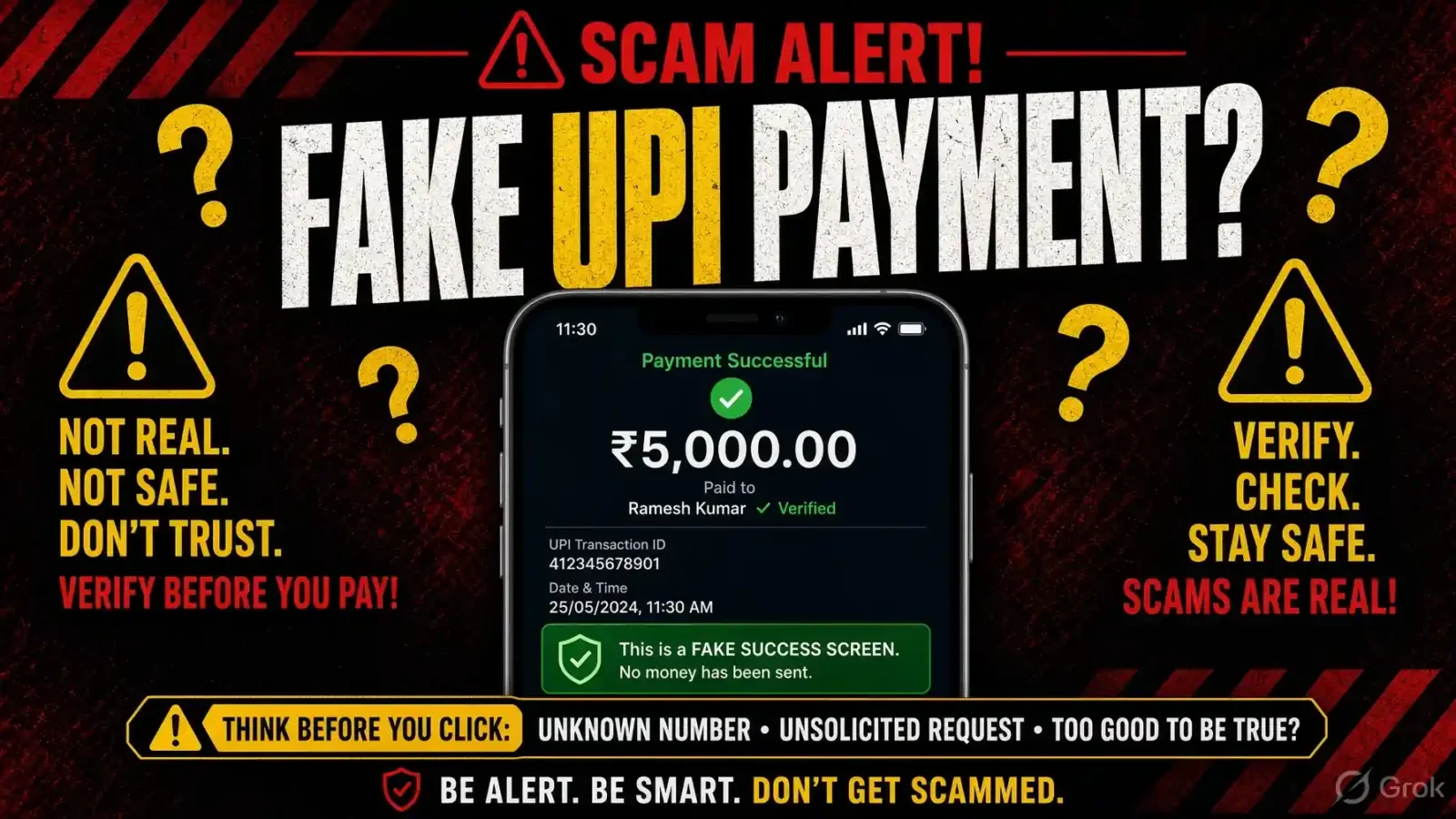
A customer picks up goods, takes out the phone and shows a green "Payment Successful" screen. The shop is busy, so you hand over the goods. Later you find the money never reached your account. This is the fake UPI screenshot scam, and small shopkeepers, delivery staff and online sellers are easy targets.
How the scam works

According to Razorpay, fraudsters create false payment confirmations so you believe you have been paid. The common forms are:
- Edited screenshots or videos: a real payment image is altered to change the amount or name
- Fake payment apps: India TV reported fraudsters building lookalike UPI apps that resemble PhonePe or Google Pay and show a successful-payment screen
- Imitated payment sounds: in some cases the alert tone is mimicked although no money moved
- "Payment is processing": the customer blames a delay and leaves with the goods
The one rule that matters
Pine Labs advises always verifying the payment directly in your own UPI app or bank account, and never treating a screenshot as proof of payment. Razorpay's safe rule says the same: if you cannot see the credit in your account or dashboard, treat it as unpaid and do not hand over the item.
Six checks every shopkeeper should make
- Check your phone, not the customer's. Look at the amount in your UPI app history or bank SMS.
- Look for the official bank or app alert. Razorpay lists no notification from your bank as a classic sign of a fake payment.
- Use a soundbox or instant alerts, but do not rely on them alone. India TV's report says a fake-app scam can even trigger a convincing sound, so confirm large amounts in bank records.
- Match the transaction ID and amount. Ask for the reference number and verify it in your statement.
- Look for flaws in the screenshot. ClearTax says fake notices often have grammar errors and inconsistent branding, but good fakes are hard to spot by eye, so do not rely on this alone.
- Train your staff. Make sure everyone knows: no credit in the account means no goods.
If the customer pressures you
Lines like "network issue" or "money is deducted, it will arrive soon" should not make you release the goods. Real delays do happen, but that is no reason to hand over goods unpaid. Politely say the goods are yours to take once the money shows. To understand genuine failed or stuck payments, see our guide to a failed UPI payment and refund.
If you have been cheated
- Save the customer's details, time, CCTV footage and the screenshot.
- Inform your bank's customer care.
- ClearTax says you can contact your bank, use NPCI's UPI dispute portal or file a cybercrime complaint.
- Report on the cybercrime helpline 1930 or at cybercrime.gov.in.
- File a report at the local police station, especially for a large amount.
If you yourself sent money to the wrong account, read money sent to a wrong UPI or bank account.
FAQ
Is a screenshot proof of payment?
No. Payment is certain only when the amount shows in your account or UPI app history.
Does a soundbox alert guarantee the payment?
It usually helps, but some reports say fake apps can imitate the sound. For larger amounts, check bank records.
Do I need to inspect the customer's app?
No. You only need to confirm the credit on your side.
Where do I report this fraud?
To your bank, the 1930 helpline, cybercrime.gov.in and the local police.
What if the payment is genuinely delayed?
Delays do happen, but release goods only after the money shows up.
This is general guidance. For exact complaint steps, check your bank, NPCI and the cybercrime portal.
Also read: ATM or Debit Card Lost? What to Do First: Block the Card, Report and RBI Zero Liability Rule | Will Your Bank Account Be Frozen If KYC Is Not Updated? RBI Rules Explained
Sources
- Razorpay: Fake payment screenshot scam and Fake payment app scams
- Pine Labs: Fake payment screenshot fraud, 2026 guide (May 2026)
- Cashfree: Fake payment screenshot scams
- ClearTax: Fake UPI payment, how to identify
- India TV News: fake UPI apps and soundbox alert
- Moneylife and Bajaj Finserv: preventing fake UPI payment scams

















Share Your Opinion
Comments are closed on this post.