 Vista

A hotel desk, a SIM shop, an office, a coaching centre, a cooperative bank: everywhere asks for a photocopy of your Aadhaar card. People hand it over without thinking, and then wonder: “Is it safe to give an Aadhaar photocopy? Could someone misuse it?” The honest answer is neither “never give it” nor “no problem”. What matters is who you give it to, for what purpose and in what form.
In this post we explain the history of the UIDAI advisory, what a masked Aadhaar is, how to download one, where a full copy is fine and where a masked copy is better, and how to check whether your Aadhaar has been misused.
What did the UIDAI advisory say?
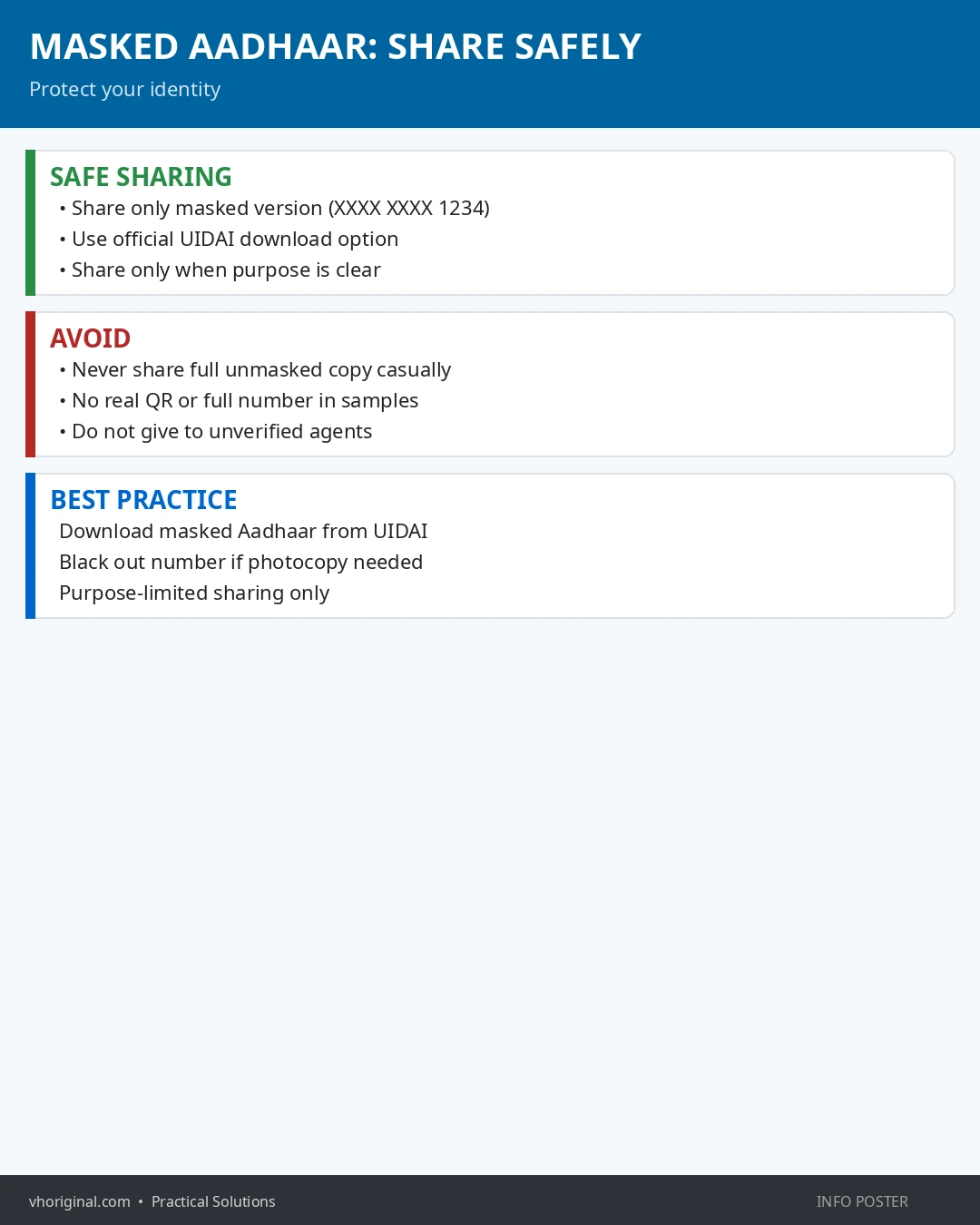
In May 2022, UIDAI’s Bengaluru regional office issued a press release saying people should not share a photocopy of their Aadhaar with any organisation because it can be misused. It suggested using a “masked Aadhaar”, which shows only the last four digits of the number.
Two days later, on 29 May 2022, the Ministry of Electronics and IT (MeitY) withdrew the advisory, citing the possibility of the press release being misinterpreted. The clarification said Aadhaar holders are only advised to exercise normal prudence in using and sharing their Aadhaar number.
So the position today is that giving a photocopy is not legally forbidden, but it is sensible to avoid giving a full copy where a masked one will do. The earlier advisory also said that only organisations holding a valid user licence from UIDAI can use Aadhaar to establish a person’s identity.
What is a masked Aadhaar?
A masked Aadhaar hides the first eight digits as “XXXX XXXX” and shows only the last four. Everything else, such as the name, photo, QR code and address, stays the same. You download it from UIDAI’s official website, and it is generally accepted as proof of identity.
How to download a masked Aadhaar, step by step
- Open UIDAI’s official site, myaadhaar.uidai.gov.in.
- Click “Login” and enter your Aadhaar number and the captcha.
- Click “Send OTP”. The OTP goes to the mobile number linked to Aadhaar.
- Enter the OTP to log in.
- Under “Services”, choose “Download Aadhaar”.
- Review the details and select the option “Do you want a masked Aadhaar?”.
- Click “Download”. You get the file as a PDF.
Note: the downloaded PDF is password protected. The password is usually based on the first four letters of your name in capitals and your year of birth, but check the exact rule shown on the site at the time of download.
One more precaution: do not use a cyber cafe or public computer to download e-Aadhaar or masked Aadhaar. If you must, delete the file from that computer afterwards and log out.
When to give a full copy and when a masked copy (chart)
| Situation | What is better to give |
|---|---|
| Private places like hotels, lodges, coaching centres, gyms | Masked Aadhaar, or another ID such as a voter ID or driving licence |
| SIM card, bank account, KYC and other regulated work | Where rules require the full number, give it only to an authorised entity and take an acknowledgement |
| Government scheme forms | Give what is asked directly to the government office or an authorised centre |
| An unknown website or app online | Do not give. First check that it is genuine and authorised |
| A relative or agent who will “get the work done” | Think first. Where a masked copy works, give that |
Precautions when handing over a photocopy
- Know why it is being asked. If the reason is not clear, ask, and refuse if you do not feel it is necessary.
- Write the purpose and date. Write across the copy, for example “For SIM verification only, 26.11.2026” and sign it. This makes it harder to reuse for another purpose.
- Give a masked copy wherever possible.
- Take a receipt or acknowledgement, especially at banks and telecom companies.
- Never share your Aadhaar number or OTP over an unknown link or phone call.
How to check whether your Aadhaar has been misused
UIDAI’s site has an “Aadhaar Authentication History” facility showing which services authenticated your Aadhaar in recent days. If you see an authentication you did not perform, that is a warning sign.
- Log in on the UIDAI site.
- Under Aadhaar services, choose “Aadhaar Authentication History”.
- Select the date range and verify with an OTP.
- If you see an authentication you do not recognise, report it through the UIDAI helpline or website.
Also keep an eye on the mobile number linked to your Aadhaar and on the SMS alerts that come to it.
Common ways Aadhaar copies are misused
- Attempts to open fake SIM cards or bank accounts using a copy.
- Links sent in the name of “Aadhaar update” or “complete your KYC” to capture your OTP and details.
- Reusing a copy for another purpose without your knowledge.
The best protection is to share Aadhaar only in limited ways and only as needed, and to give a masked copy where it will do.
Frequently asked questions (FAQ)
Is giving an Aadhaar photocopy illegal?
No. The UIDAI advisory against giving photocopies was withdrawn, but advice to be careful remains.
What is a masked Aadhaar?
A copy that shows only the last four digits of the Aadhaar number, with the rest hidden.
Where do I download masked Aadhaar?
From myaadhaar.uidai.gov.in, under “Download Aadhaar”, by choosing the masked Aadhaar option.
Must I give a copy to hotels and private bodies?
According to the earlier advisory, only organisations with a UIDAI user licence can use Aadhaar to establish identity. In private settings it is better to give a masked Aadhaar or another ID.
How do I check for misuse?
Look at “Aadhaar Authentication History” on the UIDAI site.
Can I download Aadhaar at a cyber cafe?
UIDAI has advised avoiding public computers for downloading e-Aadhaar.
Also read: How to Check Which Mobile Number Is Linked to Your Aadhaar (Step by Step) | How to Check an Original Aadhaar PVC Card: Security Features and How to Spot a Fake
Sources
- UIDAI: Clarification on Aadhaar sharing issue (29 May 2022)
- Business Standard: Govt withdraws advice against sharing photocopies of Aadhaar
- Business Insider India and Scroll: coverage of the withdrawn advisory
- The Quint: How to download masked Aadhaar
- Free Press Journal: Masked Aadhaar download steps
- UIDAI’s official website myaadhaar.uidai.gov.in























Share Your Opinion
Comments are closed on this post.