The new EPFO WhatsApp service gives provident fund members another way to look up routine account information. The government announced the launch on November 1, 2026, listing PF balance, the latest five transactions and passbook information among the facilities. This guide, prepared on November 2, explains the reported contact number and workflow, the difference between the records, and what to do if the chat does not respond. Receiving an account message should not be confused with receiving money in your bank account.
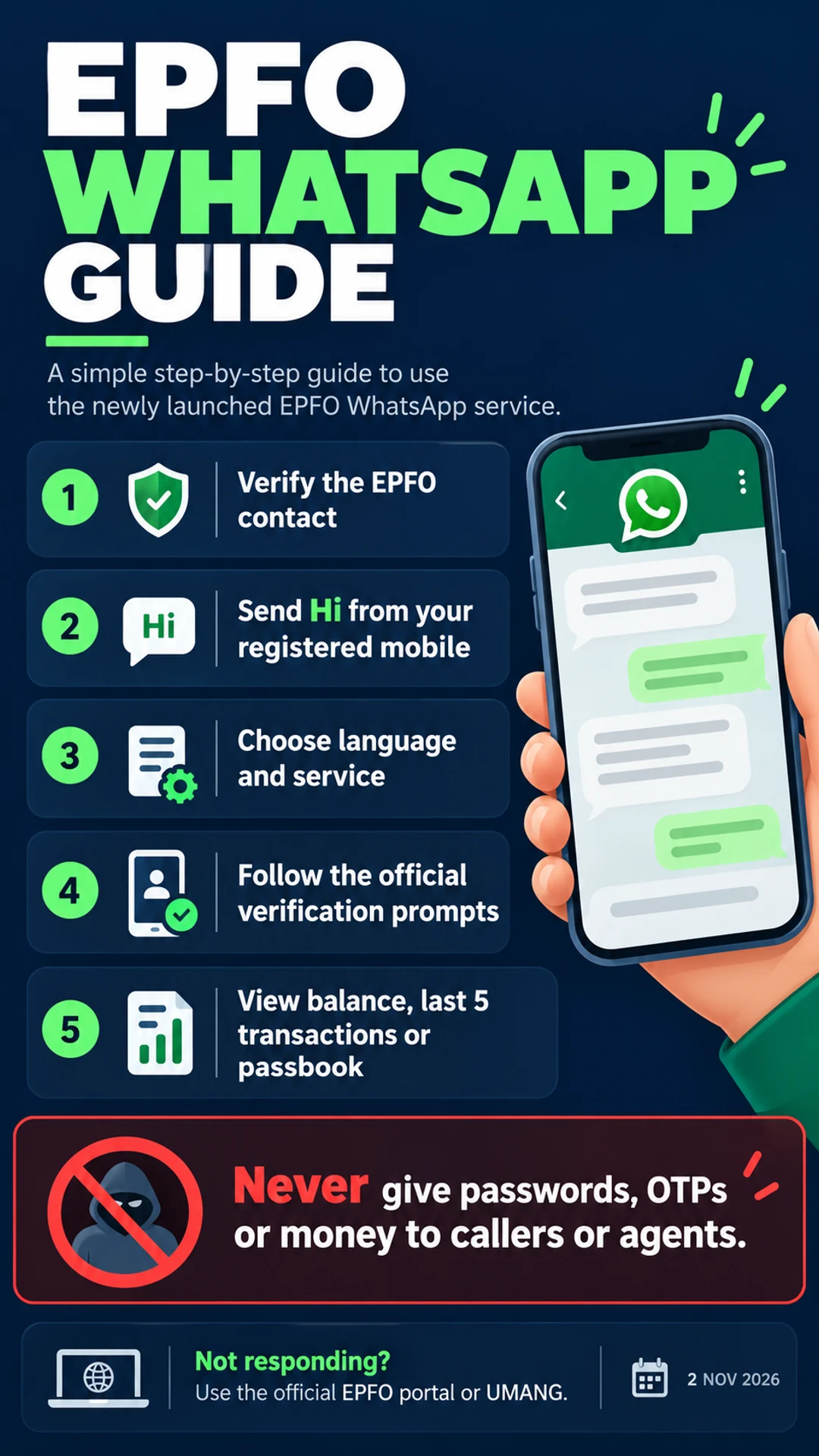
Quick starting point: Reports reproducing EPFO’s announcement give the WhatsApp number as +91 8796441800. Match it against EPFO’s current official communication before starting. Use WhatsApp on the mobile number registered with your UAN, send “Hi”, and choose from the language and service options actually displayed. Response times and the exact menu may vary; this article does not promise that every request will work instantly.
1. What has EPFO launched?
The November 1 PIB release confirms the launch and its principal information services. It also mentions assistance with PMVBRY-related requirements. This article concentrates on balance and passbook access rather than scheme eligibility. Seeing a guidance option does not establish that a person qualifies for a benefit; the relevant rules still apply independently.
It helps to distinguish three things that can look similar on a phone: a WhatsApp Channel carrying general announcements, a service conversation responding to menu selections, and a regional office’s older grievance contact. A forwarded list of local helpline numbers is not automatically a directory of the new account-information service. Start from the current announcement rather than assuming that every EPFO-branded contact performs the same function.
2. How to check PF balance and passbook information
Verify the contact. Compare the complete number, including the +91 country code, with EPFO’s official communication. A familiar profile photograph or display name alone is not enough to identify a service. Open the contact details and read the digits. If a message redirects you to a different number or asks you to continue with an individual agent, pause and verify the destination independently.
Start from the registered mobile. Send “Hi” using the WhatsApp account associated with your UAN-registered number. On a dual-SIM phone, the SIM currently used for mobile data and the number registered with WhatsApp may be different. Check the WhatsApp account information instead of assuming that a message is sent from whichever SIM you used most recently.
Read the menu. Choose a convenient language from the options offered, then select balance, recent transactions or passbook as required. Button labels and ordering can change. Instructions in an old video saying “press option two” should not override the menu on your own screen. There is no need to send a long personal explanation when the displayed menu already offers the relevant service.
Follow the official verification flow. Read any identity-verification instructions carefully. If an account-selection screen appears, choose the relevant employment record rather than the first entry automatically. If the verification route looks suspicious, stop and use the official portal. Do not hand passwords, OTPs or documents to a caller or agent who offers to complete the process on your behalf.
3. Balance, last five transactions and passbook are different
A balance is a summary; the latest five transactions are a limited view of recent activity; a passbook is useful for reviewing a more detailed account record. Those outputs answer different questions. A transaction missing from the most recent five entries is not, by itself, evidence that the transaction never existed. Match the period and account to the question you are trying to answer.
For example, someone who changed jobs several months ago may be looking for an entry from an earlier employment period. A recent-activity screen may be the wrong place to settle that question. First check which record is selected and which dates are shown. This is a method for reading information carefully, not a conclusion about whether a particular employer has deposited money.
A salary slip and an EPF account record also serve different purposes. If they appear inconsistent, note the relevant employer, month and entry before asking for clarification. Keep the supporting documents together instead of treating a single balance screenshot as a complete contribution history. Our explanation of CTC versus in-hand salary provides useful background on the different components appearing on a payslip.
4. Prepare your UAN-linked mobile details
Before starting, establish which mobile number is recorded against your UAN. This matters after changing a SIM, moving WhatsApp to a new number, or replacing a phone. Using a relative’s account because it happens to be available can create a verification mismatch. Identity checks are part of handling private account information; they should not be outsourced to an unfamiliar person simply to save a few minutes.
If you no longer have access to the old number, repeated messages from another number do not update the underlying member record. Check the official member facilities for the current procedure relevant to your situation. This guide does not invent a universal mobile-change form, fee or completion deadline. The next step depends on the account details and the official options available to the member.
5. What if the EPFO WhatsApp service is not working?
News reports published after the launch describe complaints about responses and OTPs. That does not establish a universal outage or a single cause for every unsuccessful attempt. Separate the stage at which your request failed from assumptions about the whole system. A missing initial reply, a menu that opens without account information, and an unavailable passbook option are different observations.
If there is no reply to “Hi”, check the full contact number and your connection first. If the menu appears but account access fails, review the registered-mobile requirement and selected record. Trying again later may be reasonable, but repeatedly requesting codes or sending a stream of messages is not a guaranteed fix. Avoid inventing a diagnosis such as “your account is blocked” from a single failed interaction.
For an urgent record, use the official EPFO passbook portal or the available EPFO service through UMANG. When seeking help, record the date, time and general error message. Before sharing a screenshot, conceal the UAN, mobile number, account amounts, identity details and any other personal information. A public social-media reply is not an appropriate place to publish a complete passbook.
6. Protect passwords, OTPs and account information
The EPFO passbook portal warns members about calls seeking private information, OTPs or payments. Treat a request to pay an individual to “release your PF” as a reason to stop and verify through official channels. A caller offering to retrieve the passbook by screen sharing should not gain access to your phone or login simply because the explanation sounds convenient.
Distinguish a verification step within a service you deliberately opened from reading a code aloud to a person. Do not send an OTP to an agent, install an APK received in a personal chat, or provide bank-login credentials to solve a balance enquiry. If anything about the route is unclear, close it and start from the official website. Keeping control of the device is more important than completing the enquiry quickly.
7. A practical checklist after the record arrives
Confirm the relevant account and date range before interpreting an entry. Save a necessary record privately and give the file a clear name so that it is not confused with an older download. On a shared phone or computer, consider who else can open the file. Sending the entire passbook to an office group can disclose financial information to people who do not need it.
Think of checking a balance, understanding contributions and raising a discrepancy as three separate tasks. Obtain the information first, compare it with the documents relevant to your question, and then approach the appropriate official help route if clarification is needed. This avoids turning an unfamiliar entry into an immediate claim that money has disappeared or that a pending payment has definitely arrived.
8. Frequently asked questions
What is the EPFO WhatsApp number? Reporting that reproduces EPFO’s announcement gives +91 8796441800. Verify it against the organisation’s current communication before sending a message. An unsolicited forward should not be your only source for a financial-service contact.
Can I access my passbook through WhatsApp? Passbook information is included in the government launch announcement, and workflow reports describe a download option. Follow the menu actually available to you. If it fails, use the official passbook portal rather than an unofficial download link.
Can I use any WhatsApp number? Process reports specify the mobile registered with the member’s UAN. If your WhatsApp number differs, check your registered contact details through the official facilities before assuming that the service itself is unavailable.
Does a balance enquiry withdraw PF? Viewing information is not confirmation of a withdrawal or payment. Where a separate claim or verification is required, follow the applicable official process. Do not interpret a balance message as approval of a pending request.
What should I do if an OTP or reply does not arrive? Check the number, connection and registered-mobile details, then consider the official portal or UMANG. Do not pay an agent or send private credentials to obtain a supposedly faster response.
Sources and reporting date: 2 November 2026. PIB: official launch announcement, 1 November 2026 · Economic Times: number and workflow · Aaj Tak: reported initial issues, 2 November 2026 · Official EPFO passbook portal