Does the file contain Hindi audio or only Hindi subtitles?
A filename says Hindi, Dual Audio or Multi, but the voices are English. Sometimes only the words at the bottom are Hindi. That does not automatically mean the player is broken. First identify the audio tracks, the currently selected stream and whether the Hindi label belongs to audio or subtitles. These are separate questions that a filename cannot reliably answer.
Use two complementary checks: inspect available track metadata, then listen to the selected audio in a player. Our local checker reports existing labels rather than creating a language claim from speech recognition. Missing or inaccurate tags make listening particularly important; a technical report and an audible language check serve different purposes.
Separate audio tracks, subtitles and dubbing
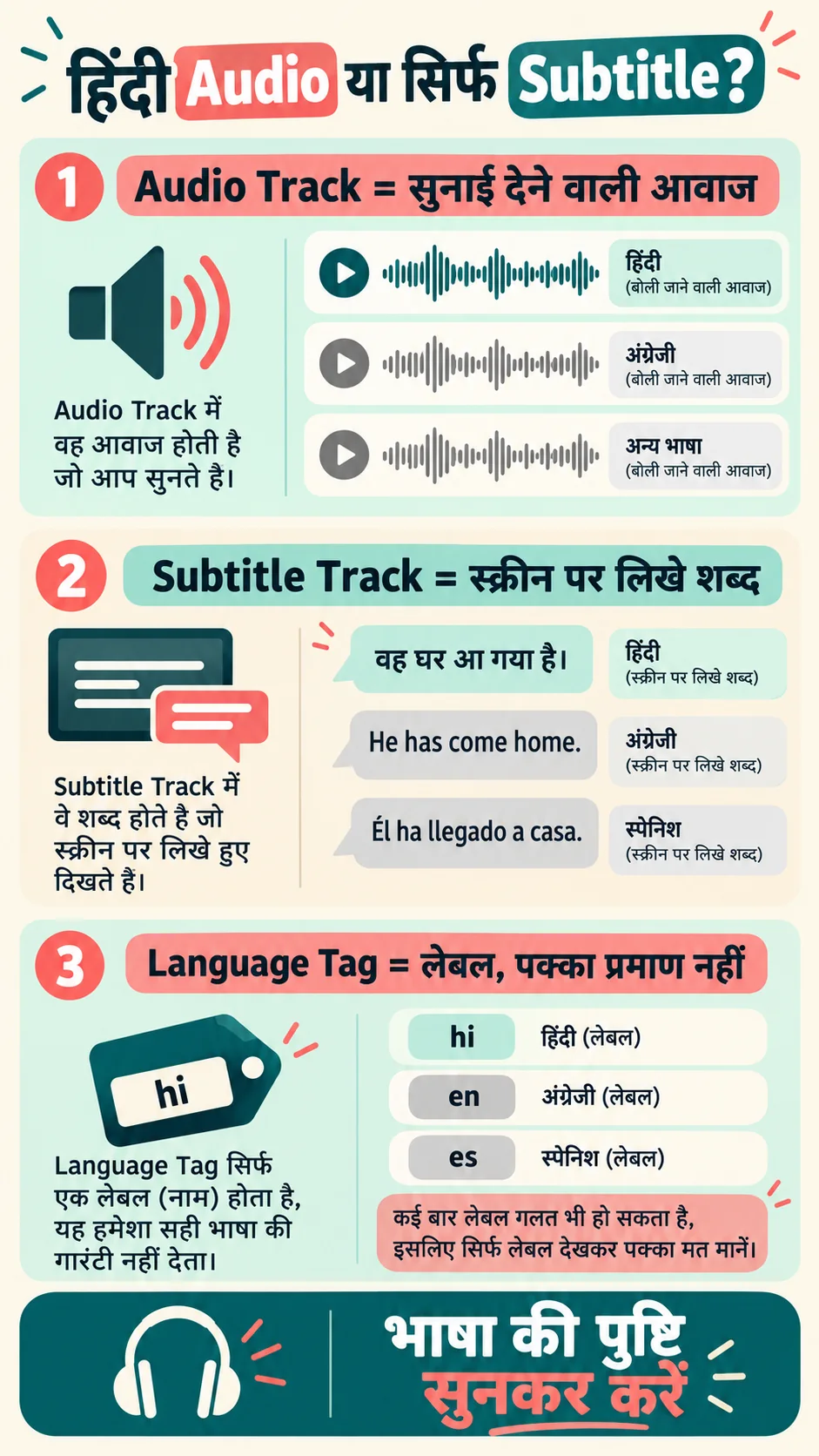
An audio track carries dialogue, music and other sound. A subtitle track displays written words. Hindi subtitles do not create a Hindi dub. Two audio streams also need not be two languages; they may represent different versions or content in the same language. Check what is actually present before selecting a preferred stream.
| Reported item | What it indicates | What it does not prove |
|---|---|---|
| Audio language: Hindi | A Hindi tag on an audio stream | Spoken language verified without listening |
| Text language: Hindi | A Hindi tag on a subtitle stream | A Hindi dub exists |
| Two audio tracks | Two identified audio streams | Always Hindi and English |
| Track title: Hindi | A name supplied for the stream | The name must be accurate |
Dubbing is a separate sound recording. Selecting a written subtitle does not turn it into spoken dialogue. A file can also contain commentary or audio description, so both the track names and the audible content matter. Do not assume every extra stream is a translated movie soundtrack.
Inspect the local file’s audio and subtitle tracks
Choose your video in the Video & Audio Compatibility Checker. Audio and Subtitle tracks appear in separate sections. Available details can include format, language tag, title and Default/Forced metadata. The Video tracks section describes the picture stream rather than the language of spoken dialogue.
Inspect audio and subtitle tracks separately
For example, a file may show English on Audio 1, Hindi on Audio 2 and Hindi on Subtitle 1. Select the second audio stream in your player and listen. Do not turn that example into a rule that Audio 2 is always Hindi: stream order can change between files.
If the checker does not find a Hindi tag, it says the tag was not found, not that Hindi speech is impossible. An unlabelled stream can contain Hindi. The tool does not listen to the soundtrack or run speech recognition. MediaInfo describes its purpose as displaying available technical and tag information.
Select the audio language in a trusted player
Use a player with audio-track selection. VLC Android provides audio and subtitle controls for choosing available streams; consult its official video-player guide. Icons and menu placement can vary across app versions. Selecting a language in the subtitle menu is different from selecting an audio language.
Listen briefly to each available audio stream and use the same dialogue timestamp for comparison. Intro music alone may not identify language. Some scenes intentionally use another language, so testing a few dialogue sections gives a more useful check than drawing conclusions from one short fragment.
If the Hindi-labelled track is silent while English plays, different codecs or an output/player issue may be involved. Follow our video plays but has no sound guide. A language label and successful audible playback are separate observations. Record both rather than describing the whole file as English-only.
Treat missing or incorrect language labels carefully
Language tags and track titles are metadata supplied with the file. They may be omitted or incorrectly set. Codes such as hi or hin may be displayed as readable language names by software. A missing tag does not automatically mean English, and a title containing Hindi does not verify the recorded speech.
If two streams share the same name but play different content, identify them by listening and note the actual selection. Where supported, keep a player preference without editing your original file. A global language or track preference may still select the wrong stream in another file with different ordering or labels.
The Default flag relates to initial stream selection; it is not a quality rating or proof of accurate dubbing. Similarly, two streams are not necessarily two distinct languages. Keep track counts, supplied labels and listening results separate in your notes so another person can understand the difference.
FACT: A track count is not a language count. Default metadata does not certify the spoken language or the quality of a dub.
Embedded, external and burnt-in subtitles are different
An embedded subtitle is a separate stream within the media container. External subtitles are stored in another supported file, such as SRT or VTT. Burnt-in text is part of the image pixels rather than a separate selectable stream. The checker can therefore report no embedded subtitle track even when words are visible on screen.
For an external subtitle, check that its version, duration and timing match your video. A matching filename is not enough. Compare dialogue near the beginning and later in the file; missing scenes or a different edit can cause progressively changing timing. Work on a personal copy and preserve the original source.
Our Subtitle Timing Fixer can help with suitable timing offsets or drift. It does not translate spoken audio or create dubbing. Changing a subtitle file does not add a missing Hindi soundtrack to the video, and an inspector cannot recover a stream that was never included.
Advice: choose the correct version and share only useful report details
For your own or authorised files, review the source’s available audio-language and subtitle information. A short local check before watching is more convenient than discovering a language mismatch halfway through. Marketing words in a filename or thumbnail should not replace the track and listening checks.
Before sharing a report, inspect filenames, titles, creator/date tags and any other private details. Uploading the entire video to a support conversation may be unnecessary; a relevant track list can be sufficient. Distinguish “tag found”, “confirmed by listening” and “selected track will not play” in your request.
If the source does not contain a Hindi soundtrack, this tool cannot manufacture it. Look for an appropriate licensed or authorised version, or use available subtitle options. A subtitle control should not be presented as a way to obtain dubbing that does not exist in the file.
Frequently asked questions
Does dual audio always mean Hindi and English?
No. It can mean two audio streams; inspect their labels and listen to determine the contents.
Why is audio English while subtitles are Hindi?
They are separate streams. If Hindi audio is available, choose it through the audio menu.
Does no Hindi tag mean no Hindi speech?
Not necessarily. Listen to unlabelled streams to confirm.
Does the checker recognise speech language?
No. It reads available metadata; it does not perform speech-language detection.
Why are subtitles visible when no subtitle track is found?
They may be burnt into the picture or supplied by an external subtitle file rather than an embedded stream.
References: MediaInfo, MediaInfo fields, VLC audio/subtitle selection and MDN containers. Reviewed: 14 October 2026.
General information. Metadata does not certify spoken language or playback in every player.